FeedDemon 1.10 RC3

I’ve just uploaded FeedDemon 1.10 RC3, which fixes a long-standing (but hard to reproduce) bug that caused read items to be marked as unread. I realize it’s only been a week since the last release, but given the number of people who have reported this bug, a new build is certainly warranted.

For download details, stop by the FeedDemon beta site. For complete details on what’s new, please check out the release notes.

Feel free to post comments about RC3 in either the beta newsgroup or in the new web-based forums. Either way, please be sure to include 1.10 RC3 in the subject line.

Enjoy :)

RSS abuse and Slashdot IP banning

I’ve had a number of people ask me about this blog entry, whose title suggests that FeedDemon was banned from Slashdot. If you read the entire entry you’ll find out that the subject is misleading – it’s really about how Slashdot tries to protect itself from people who make too many requests on their feed.

Given the unnecessary bandwidth consumption caused by some RSS readers, Slashdot certainly has every right to try to protect themselves from RSS abuse. The problem is that they ban based on IP address – which obviously causes problems for those behind a proxy server that shares a single IP address with dozens of other users. In all fairness, though, I’m not sure of a better solution to Slashdot’s valid concerns.

Anyway…since some who read the aforementioned article thought it might be due to a problem in FeedDemon, I just wanted to make it clear that this will happen regardless of which RSS reader you use if you’re behind an IP-sharing proxy. As I pointed out in an earlier post, FeedDemon employs a number of techniques to keep bandwidth consumption to a minimum – which not only keeps it ‘Net-friendly, but also makes it extremely fast since it doesn’t waste time performing unnecessary updates.

Results of the FeedDemon XSLT Challenge

Last I week I posed a challenge to XSLT gurus: create a FeedDemon newspaper style that groups items by their links, so that items which talk about the same thing are grouped together. My XSLT skills weren’t up to the task and I was doubtful it was even possible, but thankfully I was proven wrong :)

Jon Havrda stepped in and showed how it could be done with a little JavaScript help, and I took his example and created a FeedDemon newspaper style from it. If you’re viewing this in FeedDemon, just click the link below to give it a try:

Related.fdxsl

A few days later, XSLT whiz Radek Gontarek emailed me with another approach, which turns out to be even faster. Here’s Radek’s description of how it works:

What does the style do ? At the beginning the input xml file/stream is preprocessed – all links from items’ descriptions are extracted and added as new child elements (<storyLink>http://</storyLink&gt;) to parent <item> elements. Then comes the real processing (second pass): i.e. Gray Boxes plus MuenchianGrouping.

If you’re viewing this in FeedDemon, click the link below to see this in action:

Group by Story.fdxsl

Thanks to all those who participated in the challenge – you helped me learn a lot about XSLT, and showed off the power of FeedDemon’s newspapers in the process :)

FeedDemon and RSS enclosures

[enclosure icon]The RSS enclosure element is used to attach media (such as video) to a news item. The original design of enclosures was to enable downloading media attached to news feeds while the computer wasn’t in use – for example, downloading MP3s while you sleep – so you wouldn’t have to wait.

I have to confess, though, that I was never wild about this idea, at least not for FeedDemon’s purposes. If you read a news item that was just retrieved by your aggregator, you probably want to see the enclosure right then and there rather than wait for it to be downloaded when the computer is idle.

More importantly, much (but admittedly not all) of the Web’s media is designed to be streamed, so rather than download enclosures, why not simply link to the media object and let the system’s default media application take care of it? For example, if a news item has a video enclosure, just link to it and let the media application stream it to you – no wait, and no wasted hard drive space.

So, this is how FeedDemon handles RSS enclosures. If FeedDemon encounters a news item with an enclosure, you’ll see a paper clip (“attachment”) icon in the newspaper. Just click this icon to view the media.

Feature Highlight: FeedDemon Search Channels

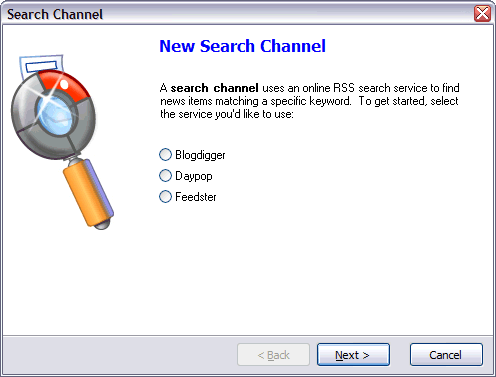
FeedDemon’s search channels are dynamic feeds which use an online search service to look for items containing specific keywords, providing an efficient way to track what people are talking about without having to subscribe to additional feeds. For example, I have a search channel which lets me know when people are blogging about my software.

FeedDemon enables choosing from popular RSS search engines such as Feedster, Daypop and Blogdigger, but you’re not limited to just these ones. If you’d like to find out how to extend the set of FeedDemon’s search services, just <a href="http://www.w3os.nl/logos/permalink.php?id=1048_0_1_0
“>visit Oskar van Rijswijk’s blog.

FeedDemon 1.10 RC2

[FeedDemon]FeedDemon 1.10 RC2 is now available from the FeedDemon beta site. As with all version 1.10 pre-releases, RC2 is only available to those who have purchased version 1.0.

RC2 fixes a number of bugs, including several related to Atom newsfeeds. For complete details on what’s new, please check out the release notes.

Note: Because my new web-based forums are still being tested, it’s probably better if everyone continues to post comments about v1.10 in the newsgroups. But if you’d prefer to post in the forums and understand that your messages may be deleted once the forums go live, please feel free to use the FeedDemon 1.10 Beta forum. I’ll reply to messages in either location.

Coming soon: web-based support forums

I’ve been on the prowl for a suitable web-based replacement for my newsgroups for quite a while, and after testing pretty much every forums package on the market, I’ve decided that the latest version of InstantForum.NET is the best one out there. I’m still testing the software, but if all goes well I plan to offer web-based support forums very soon.

Now, I realize that some people (including myself, btw) prefer the efficient, threaded discussions that newsgroups offer. However, I’m running into more and more customers who are behind corporate firewalls which block them from accessing newsgroups, so the switch really is necessary.

And because web-based forums store their messages in a database, it’s far easier to archive messages for searching and provide features such as RSS feeds. They’re also simpler to moderate, and they’re certainly more customizable.

If you’d like to try out the forums before they go live, feel free to test them by following this link. Note that this is only for testing, though – messages posted now will most likely be removed once the forums go live.

FeedDemon XSLT Challenge

Jason Fried points out an interesting idea for an RSS reader: make it group items that link to the same story. This sounded like a simple task for FeedDemon’s XSLT-based newspaper styling – I figured, just use the Muenchian Method to group items that have the same <link>. Problem solved!

Then I remembered that the RSS <link> element is the URL of the item itself rather than the URL of the story being discussed. Oops.

One possible solution is to group items by title, since items that talk about the same thing often have the same title. However, because this isn’t always true, grouping items by title isn’t entirely reliable. (If you’re viewing this in FeedDemon, you can see what I mean by clicking here to apply a newspaper style that groups by title).

What’s really needed is a way to group by the links within each item’s description, but my limited XSLT experience has left me scratching my head over how to do this. So…are there any XSLT gurus out there who want to take a crack at this?

RSS readers and bandwidth consumption

Wired recently asked whether RSS readers will clog the Web, raising concerns about bandwidth problems associated with RSS. While these concerns are valid, they’re really less about RSS and more about the poor design of some RSS readers. So, I’d like to point out how FeedDemon was designed to minimize bandwidth consumption.

The primary concern is how often RSS readers download feeds to check for new items. After all, if a feed is updated once a day, there’s a huge waste of bandwidth if RSS readers are downloading the feed every few minutes. However, a well-designed RSS reader won’t download the entire feed if it hasn’t been modified – instead, it will do as FeedDemon does and utilize HTTP If-Modified-Since and If-None-Match (ETag) requests. If the feed hasn’t changed, then the server simply returns a 304: Not Modified response, which requires very little bandwidth. FeedDemon also supports GZIP compression and it remembers redirects, which further reduces bandwidth consumption.

FeedDemon honors the RSS <ttl> element, which enables feed authors to state how often the feed should be updated. FeedDemon won’t allow setting a feed’s update frequency lower than the <ttl>, so be sure to use this element in your feed if you’re concerned about unnecessary bandwidth consumption. In addition, FeedDemon honors the <skipdays> and <skiphours> elements.

And I should add that FeedDemon defaults to checking for updates every three hours, not every few minutes. Users can set the update frequency lower than this (provided it’s not lower than the feed’s <ttl>), but in my experience, few users actually do this.

So, while RSS bandwidth consumption is a valid concern, it’s a concern that I addressed from the very start when designing FeedDemon.