Culture of Complexity

My presentation last week about software simplicity reminded me of how far we are from simplifying our world through technology. I’m constantly turned off by technology because it serves to complicate rather than simplify our lives.

I can’t count the number of times I’ve wanted to assault the gadgets I use because they’re such a hassle to manage – and I’m a techie, so I’m supposed to know how to deal with them all. God help the rest of the population!

For example:

  • My computer is way too complicated and unreliable
  • My home entertainment center is almost as hard to manage and configure as a PC (I’m the only one in my family who knows how to use it)
  • My cell phone is a usability nightmare (that’s why I was excited by the iPhone)
  • My digital camera has far too many options that I’ll never use
  • Even my lowly digital watch stumps me with its assortment of buttons

And on, and on, and on. The more technology we add to our lives, the more complicated our lives become. Shouldn’t it be the other way around? Shouldn’t those of us in the tech world be working harder (a lot harder) to make our stuff simpler to use?

Beta Month at NewsGator

Once again my co-workers at NewsGator are blazing forward with a slew of announcements, including a flurry of new beta versions. Just this month we’ve announced:

  • A new beta of NewsGator Online that’s a massive improvement over the old version. The slow page loads are gone thanks to a healthy dose of AJAX, and the UI is much cleaner and easier to use than before. And there are some nice new features, including infinite scroll and keyboard shortcuts.
  • The beta of NewsGator Editor’s Desk and Buzz 2.0, which enable placing widgets on your site that contain content from other feeds. Check out the Buzz Gallery for some examples.
  • The NewsGator Plug-in for Lotus Notes, which adds feed reading features to Lotus Notes.
  • Beta versions of NetNewsWire, NewsGator Inbox, NewsGator Go, NewsGator Desktop and FeedDemon are also in the works.

All in all, this is one of the more impressive months since I joined NewsGator!

Twittering at SXSW

I’ll be at SXSW for the next few days, and I’m giving Twitter a try while I’m here to keep up with other attendees. If you want to keep tabs on me, my Twitter name is “nbradbury” (and here’s my Twitter RSS feed).

Note to the Twitter devs: When using IE, mousing over someone’s avatar shows the name of the image file instead of their user name.

Update: I’m leaving SXSW soon, and I’m no longer Twittering. It was fun while I was here, but at least for now, Twitter isn’t something I’d really want to use outside of a tech conference.

No, Jeremy, You’re Not the Only One

Jeremy, I feel your pain. I used to rely on email, but it’s almost useless to me now.

Funny thing is, if it weren’t for spam, I might not have created FeedDemon. As I’ve mentioned before, after spam and anti-spam filters made it impossible for me to communicate with customers by email, I dumped email and started using my blog and its RSS feed to communicate instead.

And that led to the creation of FeedDemon, which I’m having a blast working on. So I actually benefited from spam. Go figure.

YouTunes: An Example Yahoo! Pipe

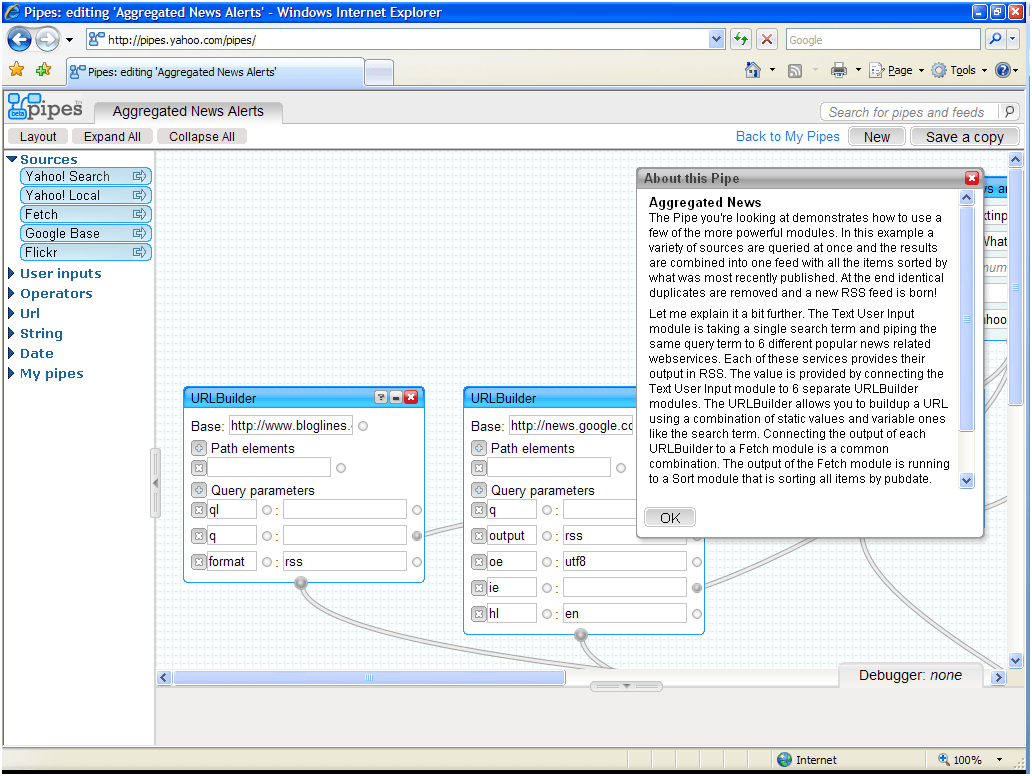
My friend Rex Hammock wants to know what Yahoo! Pipes is all about, so I whipped up a simple example “pipe” to show how it works.

A pipe takes input from different sources, mixes them together based on criteria you specify, then outputs the results as a single RSS feed. In this example, I created a pipe named “YouTunes” which links to YouTube videos of the top 10 songs on iTunes. Designing it was simple:

  1. First I dropped a fetch source module onto the canvas, and told it to use the iTunes Top 10 Songs feed as the source.
  2. Next I added a for each: replace operator module, which takes an input feed and replaces it with output from another feed. In this example, I used the iTunes feed as the input and a Yahoo! search feed as the output.
  3. I instructed the Yahoo! feed to search for the song name from the iTunes feed (itms:song), then restricted the search to http://www.youtube.com/
  4. The final step was attaching the “for each” module to the pipe output.

It’s not perfect – it needs additional filtering to weed out irrelevant videos – but I wanted to keep it simple for this example. If you’d like to check out the actual “YouTunes” pipe, you can find it here (or just subscribe to its RSS feed).

PS: Here’s how the RSS feed for this pipe looks in FeedDemon (it would look a lot better if I could figure out how to insert Media RSS thumbnails into the feed).

Yahoo! Pipes is a Platform Play

Given that Yahoo! Pipes has been clogged much of the day, chances are you haven’t been able to see it yet. So I’ll take a few minutes to expand upon my brief previous post.

What does Pipes do? Pipes enables the creation of custom RSS feeds tailored to specific interests. Here’s a very simple example: you could create a “pipe” which asks for a zip code, then generates a single feed containing information taken from a collection of weather feeds, news feeds, events feeds and sports feeds pertaining to that zip code. Or you could create a pipe which mixes news about a big event with Flickr photos of the same event. Or how about one that combines comments from the same person across multiple blogs?

However, while this feed filtering capability is exciting, the fact that Yahoo! is attempting a true web-based IDE is what makes Pipes stand out to me. Pipes offers a web-based development platform along with a web-based, drag-and-drop development tool which enables easily browsing, viewing and cloning code written by other developers working on the same platform.

In other words, this is Yahoo! making a platform play, not an aggregation play. Yahoo! is upping the ante in their competition with other web platform players (notably Google, Microsoft and Amazon).

I’m extremely impressed by how much Pipes tries to accomplish, but it does have sort of a “proof of concept” feel to it. Regardless of whether Pipes succeeds, though, it will be interesting to see whether Yahoo! creates other IDEs which build upon the lessons learned from this one.

BTW, if you’d like more information about Pipes, these links should help:

FeedDemon Wikipedia Entry

Just noticed that there’s a Wikipedia entry for FeedDemon.  Right now it’s just a stub, though, so it needs to be edited – and I can’t do it, since I’m biased.  So…is there a FeedDemon user out there who would like to update the entry?

PS: The entry for HomeSite is great – I’m really pleased to see that the history mentions how significant customer input was to the product’s design.