Android Tip: Avoid Hard-coded Sizes

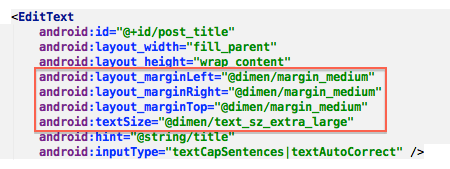
I often run across Android layouts which use hard-coded margins, padding, and font sizes, like this:

android-layout-hardcoded-sizes

Doing this often leads to inconsistency. Different layouts end up hard-coding different font sizes and margins, making the app appear less polished.

To avoid this, I recommend defining the sizes in values.xml like this:

android-layout-values

And then referring to these sizes in your layouts like this:

android-layout-declared-sizes

If every layout uses only the sizes defined in values.xml, then not only will your app appear more consistent but it will also make it much easier to adjust sizes application-wide.

Un-jank Your Android ListView

Making a ListView scroll smoothly is a bit of a black art for Android developers, but there are a few simple rules:

  1. Use the View Holder pattern
  2. Do as little work as possible in getView()
  3. Reduce unnecessary overdraw
  4. Flatten the view hierarchy

The View Holder pattern is well known, but that second rule often gets ignored despite having the biggest impact.

Because getView() is called every time a cell is drawn, any extra work done there will slow things down. Things like formatting dates, manipulating bitmaps, querying SQLite, or loading image resources should be moved out of getView() and instead computed and cached prior to the list being populated.

Unnecessary overdraw can be caused when one view covers another one. If both views have a background, both backgrounds will be drawn even if the first is completely covered. The simplest way to find overdraw issues is to enable “Show GPU Overdraw” in the device’s developer options. If you see dark red blocks behind your ListView text after enabling that option, it’s time to work on overdraw. Simply getting rid of unnecessary background colors/drawables can make a huge difference. If you have an activity whose background is completely covered by another view, you may be able to get rid of one layer of overdraw by calling getWindow().setBackgroundDrawable(null) after setContentView() in the activity’s creation.

Flattening the view hierarchy in your layouts not only helps reduces overdraw but also means less work has to be done when the layout is inflated and drawn. When I create an XML layout, I’ll often use a ton of parent views (RelativeLayouts, LinearLayouts, etc.), to make it easier to group things and move them around. But once I’m happy with the layout, I try to remove as many of those parent views as possible.

Optimistic Connectivity and Sleight of Hand

A huge pet peeve of mine is mobile apps which make you to wait after you do something that requires a server API call. For example, you tap a “Like” button and are forced to look at a modal “Liking…” dialog that doesn’t go away until the app knows the like has been received by the backend.

Apps which do this are unnecessarily pessimistic about connectivity. Why make the user wait when the most likely outcome will be that the API call succeeds? I think it’s better for the app to show the new “Like” state immediately, and then deal with the rare failure in the background.

This optimistic approach is one that the folks at Instagram have touted, and I’ve followed it in all of my mobile apps.

Sometimes, though, you really do want to make the user wait, at least a little bit. In these cases, it’s often better to resort to sleight of hand which distracts the user instead of blocks them the way a modal dialog does.

I’ve found animation to be the most effective form of this trickery.

Suppose it really is important to make the user wait a couple of seconds after clicking a “Like” button to give the API call a little time. In this situation, animate the “like” button for a second or two – have it bounce, or spin, or zoom in and out.

Users will wait for the animation to end before doing something else in the app, and by the time the animation is done there’s a good chance the API call has completed. The user still waited, but because they waited by choice it doesn’t feel the same as being so obviously blocked by an annoying modal dialog.

PS: I should add that I only recommend this approach when making very lightweight requests. For heavier requests (especially ones that upload large amounts of data), a background service is a far better choice.

Run to the Hills

iron-maiden

I attended my first rock concert when I was 16: front row at Iron Maiden on their “Piece of Mind” tour.

My musical tastes have changed since then, but when I found out that Maiden was coming to a town near me – for the first time in 21 years – I just had to go and relive my long-haired “Wayne’s World” youth.

I was not disappointed. Thirty years (!) after the first time I saw them, these guys still put everything into their performance. Front-man Bruce Dickinson has more energy than should be humanly possible for someone half his age.

But the highlight for me was beforehand, when hundreds of aging metalheads in black t-shirts were waiting to get in to the arena. The show was in Nashville, and directly across the street from the arena there’s a bar where a country band plays on a patio. Much of the Maiden crowd was cringing at the country music infecting their ears – and then the country band suddenly launched into “Sweet Leaf,” a classic Black Sabbath tune.

The stunned metalheads turned around – almost in unison – shocked at what they were hearing. After it sunk in that the country band was paying tribute to one of their gods, they pumped their fists in the air and shouted in appreciation.

It was a “can’t we all get along” moment I would never have expected.

A New Home for Glassboard

for-sale-by-ownerThree years ago I joined a team that set out to create something different: a social app that values your privacy. We wanted to make an app which enabled you to share only with people you trust – no privacy settings necessary.

We’d all seen the coming storm: we knew that concerns about privacy were the next big thing. We wanted to build an app that said, “privacy is important, don’t give it up.”

But we failed.

Glassboard didn’t succeed, and is in need of a new home.

Our biggest blunder was that our focus on privacy made it hard to get started with Glassboard. Twitter, Facebook, Instagram, etc., let you immediately find and follow your friends, but after you installed Glassboard you felt like you were the only one using it. Not exactly a great first run experience.

We also had a lousy business model, but that’s a post for another day.

I continue to believe that we need more software that respects your privacy. I look at the current crop of privacy-violating social apps and shudder when I think of where they’ll take us a decade or two down the road. Or even next year.

I’d love to see Glassboard taken over by someone who shares our commitment to privacy and can take it where we never could.

Enough with the Mobile Fanboys

If you’ve been reading this blog for a while, you probably know I’m a fan of Android.

It wasn’t always that way. I was an early iPhone adopter who reluctantly switched to Android after getting a job as an Android developer.

That was in the Android 2.x days, when Android was still crap. Back then I felt so limited using Android instead of iOS, but Android 4.x reversed that. These days I can’t use an iPhone without feeling limited.

But you know what? Both iPhone and Android are amazing. You’ll get a great experience regardless of which one you choose.

Yet every article I read that mentions either Android or iPhone ends up getting a slew of comments from angry mobile fanboys. As far as these dweebs are concerned, there’s a religious battle being fought for mobile supremacy and only one mobile OS can survive.

We saw the same silliness with the “native vs. web” battle, where geeks took sides as though only one side could win. Now, of course, we see that both have won.

So it is with mobile. Both iPhone and Android have won.

If you’re one of those people who reads an article about iPhone or Android and feels compelled to comment about how one of them sucks, please do everyone – including yourself – a favor and don’t do it. The rest of the world wants you to stop filling tech blogs with your overzealous comments. You may think you’re fighting the good fight, but the reality is most of us look at you the same way we would if we heard you arguing about the best Star Trek captain.

The Crash Landing of Southwest 345

southwest345Last week the plane my family and I were traveling on crash landed.

I read somewhere that technically what we experienced isn’t considered a crash landing, but in my mind when a plane hits the runway nose first, crushes the front landing gear, and skids 2,175 feet in a shower of sparks before stopping, it’s a crash landing.

As the plane approached the runway, I was already a little nervous. The landing had been delayed due to bad weather and the plane had been in a holding pattern for over 30 minutes. At some point a flight attendant instructed everyone to not only check their own seat belt, but also check the seat belt of the passenger next to them. I’d never heard such an instruction before, so I thought something must be wrong.

Our descent felt shaky, then without warning we hit the runway with a loud BANG. People whose seat belts were loose yelled in surprise as they were thrown into the seatbacks in front of them. The engines made a horrific noise as the plane scraped down the runway, drowning out the sound of falling belongings and scared passengers. Amazingly, someone captured the experience on video.

After the plane stopped moving, we heard nothing from the cockpit. We sat for a moment wondering what to do next. Some people got up to retrieve their carry-on bags from the overhead bins, causing a flight attendant to grab the intercom and yell, “We are not at the gate, please stay in your seats!”

Then I smelled something burning. Could just be the brakes, I told myself, and I didn’t see any smoke in the rear section where I was seated (those in the front section, however, did report seeing smoke).

Soon we were told to exit the rear of the plane using the emergency chute. Everyone was on their feet, and there were shouts to “leave your carry-ons.”

Rescue personnel surrounded the bottom of the chute to catch people as they came down, which they did admirably (although I did witness one unfortunate woman tumble into the grass somehow). I slid down, then waited for my son to slide down behind me and was quickly pointed to an area some distance from the plane that I needed to get to right away.

Once we reached safety, I turned around to see the plane for the first time. That was when I realized what had happened and how serious it could’ve been. The landing felt very rough, certainly, but I didn’t expect to see the plane nose down at the edge of the runway being sprayed with fire hoses.

Like many other passengers I pulled out my phone and started capturing pictures and videos. A policeman angrily approached me, asking me to “stop filming please.” I asked why but couldn’t hear his reply.

Soon we were corralled into buses which remained motionless for quite a while. Every few minutes the doors would open so someone could come onto the bus and count us, or ask us if we needed medical attention. They’d leave, and a few minutes later someone else would do the same thing.

Eventually the buses took us away from the runway and to the airport, where we were led to a room set aside for passengers of the flight. Everyone was asked whether they needed medical attention, and now that the adrenaline was wearing off several people were feeling the pain and chose to be looked at. I should’ve been among them – I hit the seat in front of me pretty hard – but didn’t want to leave my family.

We sat waiting for information about what had happened, how we could get our bags, and when we could leave, but Southwest seemed ill-prepared to deal with the situation. To their credit Southwest made sure we had plenty of food and water while we waited, but representatives sent to talk to passengers tossed out platitudes like “your safety is our biggest concern,” which did little to assuage those who needed medicine that had been left on the plane.

At random intervals a woman would pop into the room and say, “we have no further information at this time, but we will let you know as soon as we have any information.”

Hours earlier everyone was thankful for walking away from that botched landing, but now people were becoming tired, frustrated, and angry at Southwest. We were given conflicting reports of what to do and how long we’d be there. One minute we were told our suitcases were waiting for us in the baggage retrieval area, the next minute we were told they were still on the plane.

Eventually my family and I decided to leave and have Southwest deliver our bags once they were retrieved from the plane. I was hesitant to do this because my carry-on contained an expensive Retina MacBook Pro and several other electronics, but it was very late, we were very tired, and Southwest had just offered to pay for everyone’s transportation away from the airport.

A Southwest representative told a group of us to follow “the guy in the red jacket” who would take us to the ground transportation area. Instead, he took us to the baggage area to retrieve our bags – which, of course, weren’t there. We had to explain to him that he was supposed to get us transportation.

When we arrived outside we saw a large group of fellow passengers waiting, unhappily, in the taxi line. Whoever was making arrangements was unable to “contact the right manager” about getting everyone on their way efficiently, so instead an unfortunate Southwest rep was leaning into every cab, explaining the situation to each driver – who didn’t always understand English – then paying for the ride up front with a credit card. In our case, the taxi driver didn’t understand the rep at all and kept asking if he was riding with us. It would’ve been comical if we weren’t so tired.

The next day Southwest delivered our bags to our hotel but my carry-on wasn’t among them. It arrived a day later – without my MacBook Pro. That, along with an Apple TV and a Lightning cable, had been stolen from my bag.

Southwest has agreed to reimburse me for these items once I provide proof that I purchased them (no problem, I have receipts). They claim the items weren’t stolen but were more likely “misplaced” by someone sent on board to retrieve carry-on bags.

I am, of course, concerned about my stolen belongings and bothered by Southwest’s initial sloppy handling. But it’s hard to complain too much given that my family and I walked away from what could’ve been a much worse situation.

And in the end we had a fantastic week in New York together, which ironically is due in part to my not having a laptop to distract me with work-related things.

Update: Last night we flew home (yes, we were nervous during the landing), and on our doorstep found a FedEx package from Southwest which contained a check reimbursing us for the trip along with two round-trip tickets anywhere in the U.S. for each family member.

The Last Version of FeedDemon is Here, and it’s Free

Shortly after the end of Google Reader was announced, I announced that FeedDemon was also coming to an end. My plan was to release a sync-deprived final version of FeedDemon – free of charge – before Google Reader disappears on July 1.

That last, free version is now available. Here’s the download link.

All of the features of the Pro version of FeedDemon are available in this release, and ads are no longer shown in the bottom left of the screen.

As expected, this final version of FeedDemon does away with Google Reader synchronization. The first time you run it, all of your synched feeds will be converted to “local” feeds with no synching. Note that this won’t affect your actual Google Reader subscriptions – those will remain in Google Reader untouched.

Because Google Reader identifies feed posts differently, you’ll likely see duplicated posts after upgrading to the new FeedDemon. This will resolve itself over a short time.

My thanks to everyone who helped me keep FeedDemon going for so long – when I created it in 2003, I don’t think I would’ve believed it will still be around 10 years later!  It’s been truly fun working on it, and I’m sad to see it go.

PS: If you have a question about FeedDemon, rather than comment here please ask in the FeedDemon Support Group. Thanks!

My First Week with Automattic

My first week after joining Automattic as a mobile developer was among the most unusual new-hire experiences I’ve had. Instead of jumping into the code, I did customer support – and I’ll continue to do it for another two weeks.

No, doing support isn’t punishment for some naughty bit of code I submitted. Everyone who joins Automattic is expected to complete three weeks of support before moving on to their new role.

The fact that Automattic expects this is one of the things that made me so interested in working with them. I love knowing I’m working alongside people who have all experienced what it’s like doing support.

I’ve written before about how developers should do tech support because it forces us to see our software through the eyes of our customers. Directly communicating with your end users is the single best way to find out what the problems in your software are and what you can do to simplify it.

I won’t claim, though, that my support stint has been easy. You’d think it’d be a breeze since I supported my own software for years, but this is the first time I’ve supported software I didn’t create and it has been truly humbling to feel like such a newb. Luckily, Automattic’s Happiness Engineers have been, well, happy to provide help when I’ve needed it (thanks, folks).

PS: Be sure to read Jason Munro’s excellent post about his initial experience at Automattic if you want to hear more about what it’s like to start here.

I Joined Automattic

Monday will be my first day working at Automattic.

In the past I’ve worked on consumer software and enterprise software, but this will be my first time working on open source software. It’ll also be the first time I’ve joined a company without my existing software coming with me. FeedDemon is going away soon, and I no longer work on either Glassboard or Social Sites. I’m starting fresh with Automattic, which is a very welcome change.

When I talked with Matt Mullenweg about Automattic, he mentioned being proud of the company he helped build. At the time I didn’t know too much about the company, but the more I looked into Automattic the more I realized why it’s something to be proud of – and why I wanted to work there.

They treat their employees the same way I try to treat the end users of my software. As a developer, I’ve tried to provide a great experience to those who use my software. As a company, Automattic tries to provide a great experience to those who work there. People stick with you when you provide a great experience.

They also, of course, make great software. I’m looking forward to a chance at helping them continue to do that.