RSS Good Practices: Use Descriptive Auto-Discovery Titles

RSS auto-discovery links provide a simple way to let feed applications know when your site offers an RSS feed. Although these links weren’t widely used a couple of years ago, today they’re pretty much common practice. However, what isn’t common practice yet is the use of descriptive titles in auto-discovery links.

This became clear to me after I coded a new “History of Auto-Discovered Feeds” feature for the upcoming FeedDemon 2.5. This feature – which was suggested to me by NewsGator’s Ronnie Gilbertson – lists the feeds which have been discovered during the past two weeks. Non-descriptive auto-discovery titles such as “Atom Feed” and “RSS Feed” are far too common.

I’d like to recommend that feed publishers start using more descriptive titles. It’s simple to do – just change the title attribute of the link element so that it better describes the feed. Here’s an example from my blog:

<link rel="alternate" type="application/rss+xml" title="RSS Feed for Nick Bradbury's blog" href="http://feeds.feedburner.com/NickBradbury" />

This is especially important if your site offers multiple feeds (such as one feed for posts and another for comments), since descriptive titles enable your readers to figure out which feed they want to subscribe to.

PS: It would also be nice if publishers would stop offering the same content in multiple feed formats.

My Link Blog

I’m subscribed to the feed for Robert Scoble’s link blog, and I keep finding interesting posts in it.  So I decided to create one of my own using the synchronized news bin feature that’s coming in the next FeedDemon.

If I find something that looks interesting, I’ll add it to my synchronized news bin in FeedDemon, and it will then automatically show up in its shared RSS feed.

Subscribe to my link blog feed

PS: This will replace the “link dump” posts I blog every now and then.

RSS Good Practices: Provide Alternate Content When Embedding Video

Lately I’ve noticed a lot of feeds that contain embedded videos which fail to provide alternate content for readers who can’t view the videos.  For example, a number of feeds use the HTML tag to embed video objects but neglect to include <noembed> sections.  The end result is a less-than-optimal experience for many people, including:

  1. Users of Windows-based feed readers such as FeedDemon which employ Internet Explorer’s local zone lockdown for security (which prevents embedded objects from displaying)
  2. Users of Internet Explorer 7 (the feed view in IE7 uses a similar security lockdown which prevents embedded videos from playing)
  3. Users of Web-based feed readers who have tightened their browser’s security

If nothing else, simply add a <noembed> section which links to the actual video, as this example demonstrates: 

<item>
  <title>Embedded Video Example</title>
  <description>
      <![CDATA[
        <noembed><a href="http://www.youtube.com/watch?v=mkj4Wm6INFY">Click here to view video</a></noembed>]]>
  </description>
</item>

A more user-friendly solution would be to include a <noembed> section that contains a thumbnail image of the video which links to the actual video.

If you’d like more details on embedding video objects, check out this article from A List Apart.

A Few of My Favorite Posts (Don’t Leave)

This week my blog has seen an influx of new readers thanks to people linking to my YouTunes post, and links from Lifehacker, Daring Fireball and EContent have brought in even more traffic.

If you ended up subscribing to my RSS feed as a result, I have to warn you: I’m not a regular guy. That is, I don’t post on a regular basis. One week I’ll post every day, and the next week I’ll have nothing to say. Which apparently is a great way to kill my RSS subscribers.

So…if you ended up subscribing this week, I hope you’ll stick around even when I’m posting less frequently. To entice you, here are some of the posts I made last year that I consider my favorites:

  1. Desktop Software is Paralyzed by Fear
  2. Crazy Poopin’ Bird
  3. Simplicity Ain’t So Simple, Part IV: The Blessed Curse of Power Users
  4. Web 3.0 Does Not Validate
  5. Hit and Run (side note: I find it hard to read this one now)
  6. My Web 2.0 Filter
  7. What is happening to my country?
  8. Advertising in Desktop Software
  9. Born to Code, Part I
  10. What was I thinking?

YouTunes: An Example Yahoo! Pipe

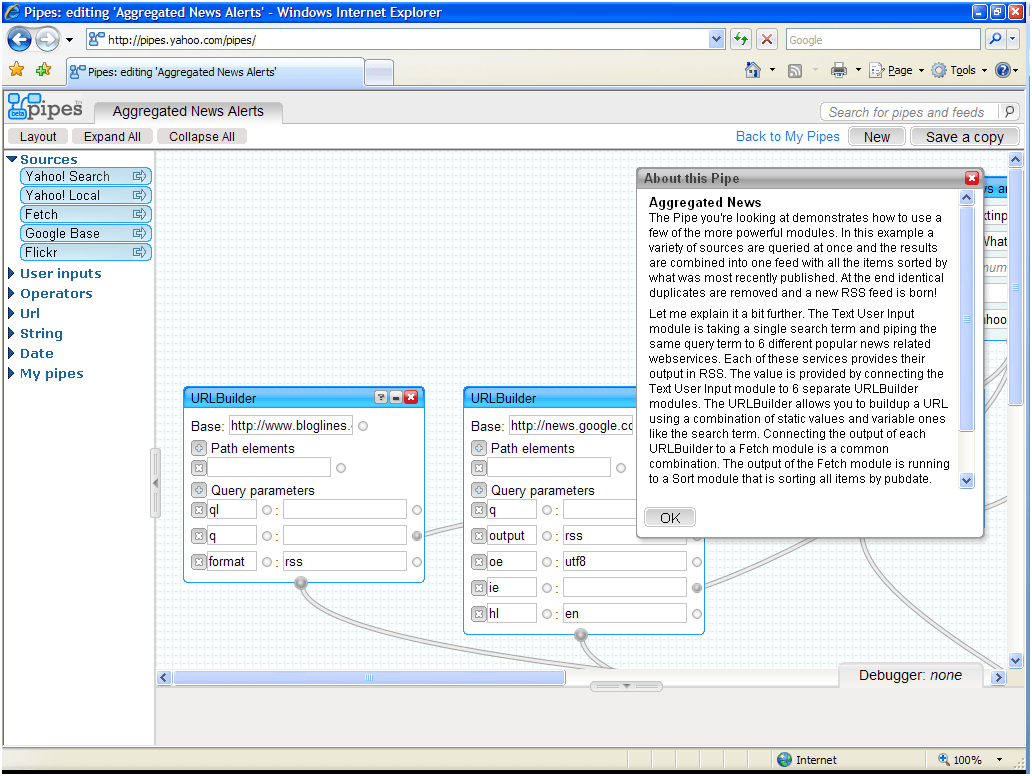
My friend Rex Hammock wants to know what Yahoo! Pipes is all about, so I whipped up a simple example “pipe” to show how it works.

A pipe takes input from different sources, mixes them together based on criteria you specify, then outputs the results as a single RSS feed. In this example, I created a pipe named “YouTunes” which links to YouTube videos of the top 10 songs on iTunes. Designing it was simple:

  1. First I dropped a fetch source module onto the canvas, and told it to use the iTunes Top 10 Songs feed as the source.
  2. Next I added a for each: replace operator module, which takes an input feed and replaces it with output from another feed. In this example, I used the iTunes feed as the input and a Yahoo! search feed as the output.
  3. I instructed the Yahoo! feed to search for the song name from the iTunes feed (itms:song), then restricted the search to http://www.youtube.com/
  4. The final step was attaching the “for each” module to the pipe output.

It’s not perfect – it needs additional filtering to weed out irrelevant videos – but I wanted to keep it simple for this example. If you’d like to check out the actual “YouTunes” pipe, you can find it here (or just subscribe to its RSS feed).

PS: Here’s how the RSS feed for this pipe looks in FeedDemon (it would look a lot better if I could figure out how to insert Media RSS thumbnails into the feed).

Yahoo! Pipes is a Platform Play

Given that Yahoo! Pipes has been clogged much of the day, chances are you haven’t been able to see it yet. So I’ll take a few minutes to expand upon my brief previous post.

What does Pipes do? Pipes enables the creation of custom RSS feeds tailored to specific interests. Here’s a very simple example: you could create a “pipe” which asks for a zip code, then generates a single feed containing information taken from a collection of weather feeds, news feeds, events feeds and sports feeds pertaining to that zip code. Or you could create a pipe which mixes news about a big event with Flickr photos of the same event. Or how about one that combines comments from the same person across multiple blogs?

However, while this feed filtering capability is exciting, the fact that Yahoo! is attempting a true web-based IDE is what makes Pipes stand out to me. Pipes offers a web-based development platform along with a web-based, drag-and-drop development tool which enables easily browsing, viewing and cloning code written by other developers working on the same platform.

In other words, this is Yahoo! making a platform play, not an aggregation play. Yahoo! is upping the ante in their competition with other web platform players (notably Google, Microsoft and Amazon).

I’m extremely impressed by how much Pipes tries to accomplish, but it does have sort of a “proof of concept” feel to it. Regardless of whether Pipes succeeds, though, it will be interesting to see whether Yahoo! creates other IDEs which build upon the lessons learned from this one.

BTW, if you’d like more information about Pipes, these links should help:

The Hype Machine RSS Feeds

Jason Calacanis just pointed to The Hype Machine, a free service which tracks MP3 blogs and builds a list of MP3 links that are downloadable by a podcatcher such as FeedStation.

Even better, they offer RSS feeds of their search results.  If you’re using FeedDemon, simply perform a Hype Machine search from within FeedDemon’s browser, then click on FeedDemon’s autodiscovery icon  after it lights up to subscribe to the search results.

Every item in the feed includes links to both Amazon and iTunes, where you can purchase the music (I’ve already purchased a CD I didn’t know existed thanks to the Amazon links).  One big missing feature, though, is Creative Commons license information – it would be nice to see that added in the future.

Google Groups Feeds

Google Groups is finally out of beta, so I thought I’d update my blog post from 2004 which described how to subscribe to Google Groups feeds in FeedDemon (or any feed reader, for that matter).

To view the available feeds for a specific Usenet group, navigate to a URL which uses this format:

   http://groups.google.com/group/NAME-OF-GROUP/feeds

Or to skip that and subscribe to an Atom 1.0 feed containing the most recent 15 messages, use this format:

   http://groups.google.com/group/NAME-OF-GROUP/feed/atom_v1_0_msgs.xml

For example, to see feeds for the alt.html newsgroup, browse to this page:

   http://groups.google.com/group/alt.html/feeds

And to subscribe to the Atom feed for alt.html, use this URL:

   http://groups.google.com/group/alt.html/feed/atom_v1_0_msgs.xml